
Block Website Trackers & Protect Your Privacy
Download System Mechanic to activate anti-tracking tools that clean cookies and stop ads from spying on you. Optimize your PC while ensuring safer browsing and enhanced privacy. Stay protected with System Mechanic today!
SYSTEM MECHANIC
4 min read
How to Block Website Trackers
Block website trackers to protect your Privacy. Download_System_Mechanic and activate its anti-tracking tools, clean cookies, and stop ads from spying on you. System Mechanic can block web trackers effortlessly and also optimize your PC while shielding your data, giving you faster, safer browsing. Stay private, stay protected. Upgrade your digital defense with System Mechanic today!

What are Trackers
A website tracker, or simply a tracker, is a small piece of code embedded in websites that monitors your activity. These trackers collect data like pages visited, time spent, clicks, and even mouse movements. They’re often invisible and operate in the background. Trackers can be cookies, pixels, scripts, or fingerprinting tools. While some are used to improve user experience (for example, remembering login details), many are designed to steal personal data for advertising, analytics, or profiling. Read this example of Tracking Cookies used for stealing money from your bank. For a novice, think of a tracker as a digital spy that watches what you do online. You may not see it, but it’s there, and it is always recording your every move. Understanding what trackers are is the first step toward protecting your privacy.
How Do Trackers Work?
Website Trackers work by embedding scripts or cookies into websites. When you visit a site, these elements are downloaded to your browser. Cookies store data, like login status or preferences, while scripts can monitor behavior in real time. Some trackers use “fingerprinting,” which identifies your device based on unique characteristics like screen resolution, browser type, and installed fonts. Others use third-party tracking, where external companies monitor your activity across multiple sites. These trackers build a profile of you, your interests, habits, and even location. This data is then sold or used to target you with ads. Most browsers don’t block these by default, so you need to take action to stop them.
Why Are Trackers Used?
Trackers are primarily used for advertising, analytics, personalization, and user experience. Advertisers want to know what you like so they can show you relevant ads. Analytics tools help website owners understand visitor behavior, what pages are popular, where users drop off, and how long they stay. Personalization uses tracking data to tailor content, like recommending products or articles. Some trackers are helpful, like remembering your login or language preference. But many trackers are intrusive, collecting more data than necessary. Companies use this data to build detailed profiles, often without your knowledge or consent. That’s why blocking trackers is essential for privacy. And don't forget cybercriminals who also use trackers to steal your Sensitive Data and steal the money in your bank. Some trackers used by airline ticket booking agencies do something bad for you. When you search for air tickets for the first time, the website shows you the correct prices. The next time you search for air tickets for the same day or same flight, you will see a higher air ticket price. Airlines do these tricks by using website trackers. This makes it necessary to block website trackers.
What Activity Do Website Trackers Record?
Website trackers can record a wide range of activities, including:
Pages visited and time spent on a website
Clicks, scrolls, and mouse movements
Search queries and form inputs
Device type, operating system, and browser
IP address and approximate location
Login status and account details
Some website trackers even monitor what you do after leaving the site. This data is used to build a behavioral profile, which can be sold to advertisers or used to influence your online experience. For example, if you search for shoes, you might see shoe ads on other sites. This level of surveillance can feel invasive, especially when done without consent.
What Are the Privacy Concerns With Website Trackers?
The biggest concern with website trackers is loss of privacy. You’re being watched without knowing who’s watching or why. Your data can be sold, shared, or leaked. Even anonymous data can be re-identified using advanced techniques. Trackers can also lead to manipulative advertising when companies use your behavior to influence your decisions. There is also the risk of data breaches, for example, a data breach that happened at this car dealership (Read more about this Data Breach), where your information falls into the wrong hands. For children and vulnerable users, tracking can be especially harmful. Many users feel uncomfortable knowing they’re being profiled. Blocking website trackers helps you regain control over your digital footprint and protect your personal information.
Methods to Avoid Website Trackers
Here are beginner-friendly ways to block trackers:
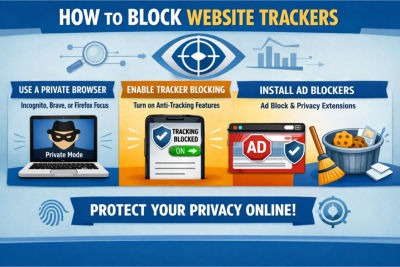
Use privacy-focused browsers like Brave, Firefox, or DuckDuckGo.
Enable tracker blocking in browser settings (look for “Do Not Track” or “Enhanced Tracking Protection”).
Install ad blockers, which are available as free extensions for your browser.
Use anti-tracking extensions, which are also available for free.
Clear cookies and cache regularly to remove stored tracking data.
Avoid logging into websites with social media accounts, which can link your activity across platforms.
Use a VPN or Virtual Private Network to mask your IP address and location, to avoid website trackers.
Disable third-party cookies in browser settings.
These steps don’t require technical expertise and can be done in minutes.
How System Mechanic Helps Block Website Trackers
Download System Mechanic Free. System Mechanic is a powerful tool that can block website trackers and simplify privacy protection. It offers the following:
Privacy Guardian: Blocks trackers, fingerprinting scripts, and ad networks.
Browser Cleanup: Clears cookies, cache, and browsing history.
Real-Time Protection: Monitors and blocks tracking attempts as you browse.
Easy Interface: No technical skills needed—just click to activate.
Performance Boost: Speeds up your PC by removing junk files and optimizing settings.
System Mechanic combines privacy and performance, making it ideal for users who want protection without complexity. It’s especially helpful for seniors, students, and anyone new to digital privacy.
Additional Tips on How to Block Trackers
If you are just starting, here are some friendly tips:
Start with one change at a time, like installing an ad blocker.
Check your browser settings. It may have built-in privacy options.
Use incognito mode for private browsing (though it doesn’t block all trackers).
Read privacy policies. Look for sites that respect your data.
Avoid suspicious links and pop-ups. Because they often contain trackers.
Update your software regularly, because security patches help block latest tracking methods.
Remember, privacy is a journey. You don’t need to do everything at once. Start small, stay curious, and keep learning. We recommend you Download System Mechanic and install it on all your devices to keep them protected. Block website cookies effortlessly today.
SystemMechanic VPN Drivers RegistryCleaner DefragmentHDD RunWindows_on_Mac Email_Marketing Windows_11
Home Sitemap Privacy Terms Disclaimer
© 2026. All rights reserved.