
Vulnerability Management
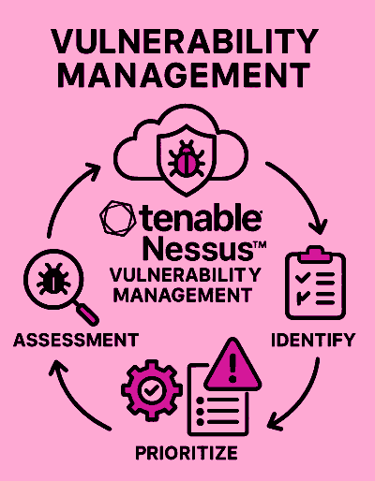
Protect your Business with Tenable Vulnerability Management, your Proactive Shield against Cyber Threats. Continuously Scan, Prioritize, Expose, and Close your Cyber weaknesses with the Market-leading Vulnerability Management solution across your entire IT environment. Trusted by Global Enterprises, Tenable empowers Security teams to act fast and stay ahead of attackers. Tenable has held the #1 Position in Vulnerability Management for Six consecutive years.

Understanding Vulnerability Management
Vulnerability management in computer networks is a structured, ongoing continuous process designed to identify, evaluate, and mitigate weaknesses, that could be exploited by Cyber attackers. It is a critical component of cybersecurity because networks are constantly exposed to evolving threats, misconfigurations, and software flaws. The first phase of vulnerability management begins with vulnerability identification, where automated tools like Tenable_Nessus_Scanner is used to scan systems, applications, and devices to detect potential risks. Next comes assessment and prioritization, which involves analyzing the severity of each vulnerability and determining its potential impact on critical assets.
High-risk vulnerabilities are addressed first to minimize exposure. The remediation phase follows, where patches, configuration changes, or security controls are applied to eliminate or reduce risks. Finally, continuous monitoring and reporting ensure that new vulnerabilities are promptly detected and managed. Effective vulnerability management not only reduces the likelihood of data breaches and service disruptions but also helps organizations comply with regulatory standards and build trust with stakeholders. Importantly, it is not a one-time activity but a cyclical process that adapts to the dynamic nature of cyber threats. By systematically managing vulnerabilities, organizations strengthen their defenses, protect sensitive information, and maintain the resilience of their computer networks in an increasingly digital world.
How Tenable Nessus Scanner Work
Get Tenable Nessus Scanner Nessus Scanner is the most widely used vulnerability management tool, designed to help organizations identify and address security weaknesses across their networks, systems, and applications. Tenable Nessus works by performing active vulnerability scans that probe devices, servers, and applications for known vulnerabilities, misconfigurations, and compliance issues. Tenable Nessus uses a vast library of plugins, updated regularly, to detect thousands of potential threats such as missing patches, insecure configurations, weak passwords, and outdated software. The Tenable Nessus scanner operates by sending crafted packets and queries to target systems, analyzing responses to uncover flaws. Once vulnerabilities are detected, Nessus provides detailed reports with severity ratings, remediation guidance, and compliance checks. It supports scheduled scans, continuous monitoring, and integration with broader security platforms for enterprise use. By automating vulnerability management and offering actionable insights, Nessus enables organizations to strengthen their defenses, reduce risk exposure, and maintain compliance with industry standards and regulations.
Benefits of Vulnerability Management Tool Tenable Nessus
Using a vulnerability management tool offers significant benefits for organizations seeking to strengthen their Cybersecurity posture. First, it provides automated vulnerability detection of weaknesses across networks, systems, and applications, saving time compared to manual checks. Tenable_Nessus_Scanner continuously scan for known vulnerabilities, misconfigurations, and outdated software, ensuring that risks are identified early. Second, these tools enable prioritization of threats, helping security teams focus on the most critical issues that could impact business operations. Third, vulnerability management tools deliver actionable remediation guidance, such as patch recommendations or configuration changes, making it easier to address problems quickly. Additionally, the Tenable Nessus and such tools, support regulatory compliance by generating detailed reports that demonstrate adherence to industry standards and security frameworks. Finally, by reducing the likelihood of breaches and downtime, these tools improve business resilience and customer trust. Overall, they transform vulnerability management into a proactive, efficient, and strategic process that safeguards digital assets.

What is Tenable Nessus Vulnerability Management Tool
Tenable_Nessus_Free_Scanner is a widely used vulnerability assessment tool that helps organizations identify and manage security risks across their networks. For beginners, it’s essential to understand that Nessus doesn’t fix problems; it finds them. Nessus scans devices, systems, and applications to detect weaknesses that attackers could exploit. These weaknesses include missing patches, misconfigurations, outdated software, and insecure protocols. Tenable Nessus is known for its accuracy, speed, and extensive plugin library, which allows it to detect thousands of known vulnerabilities. Whether you're managing a small business network or a large enterprise infrastructure, Nessus provides a detailed view of your security posture. It’s especially useful for IT administrators, cybersecurity analysts, and compliance officers who need to ensure systems are secure and meet regulatory standards. The Tenable Nessus vulnerability management tool is beginner-friendly, with a web-based interface and pre-configured scan templates that simplify the process of evaluating network security.
Tenable Nessus Installation and Setup
Getting started with the Tenable Nessus vulnerability management tool involves downloading the software from Tenable’s website and installing it on a supported operating system such as Windows, macOS, or Linux. After installation, users access Nessus through a browser-based interface. The setup process includes creating an account, activating a license (Nessus Essentials is free for personal use), and updating the plugin database. Plugins are small scripts that perform specific vulnerability checks, and keeping them updated ensures Nessus can detect the latest threats. Once installed, Tenable Nessus guides users through the initial configuration, including setting up scan policies and defining targets. Beginners benefit from the intuitive dashboard, which displays scan results, system health, and plugin status. The interface is designed to be user-friendly, with clear navigation and helpful tooltips. The Tenable Nessus vulnerability management tool setup phase is crucial because it lays the foundation for accurate and efficient vulnerability management scan across the network.
Creating and Configuring Tenable Nessus Scanner
To evaluate a network, the Tenable Nessus vulnerability management tool does scans, which is an automated processes that probe systems for vulnerabilities. Users begin by creating a new scan and selecting a template, such as Basic Network Scan, Advanced Scan, or Web Application Tests. Templates simplify the scanning process by pre-configuring settings for specific use cases. After choosing a vulnerability management template, users define scan targets, which can be IP addresses, hostnames, or entire subnets. They can also schedule scans to run at specific times, reducing disruption during business hours. Credentialed scans, which use login credentials to access systems, provide deeper insights than non-credentialed scans. These Nessus scans can detect missing patches, insecure configurations, and outdated software versions. Beginners should start with basic scans and gradually explore advanced options. Tenable Nessus vulnerability management tool allows customization of scan policies, including timeout settings, port ranges, and plugin selection. This flexibility ensures that scans are tailored to the network’s architecture and security requirements.
Discovery and Enumeration
Once a scan begins, Tenable Nessus vulnerability management tool enters the discovery phase, where it identifies live hosts, open ports, and running services. This phase is like taking inventory of the network; it helps Tenable Nessus understand what systems are active and what software they’re running. Tenable Nessus vulnerability management tool uses techniques such as ping sweeps, TCP/UDP port scanning, and service fingerprinting to gather this information. It can detect operating systems, web servers, databases, and other applications. Enumeration goes a step further by collecting detailed data about each service, such as version numbers and configuration settings. This information is critical because vulnerabilities often depend on specific software versions. For example, a web server running Apache 2.4.49 may be vulnerable to a known exploit, while version 2.4.51 is not. By accurately identifying software and services, Nessus ensures that its vulnerability checks are precise and relevant to the target environment.
Vulnerability Detection
After discovering and enumerating network assets, Tenable Nessus vulnerability management tool begins vulnerability detection. This is the core of its functionality. Tenable Nessus vulnerability management tool compares the information it gathered against its vast plugin library, which contains checks for over 180,000 known vulnerabilities. These plugins are updated daily to reflect the latest security threats. Tenable Nessus tests for missing patches, insecure configurations, outdated protocols, and known exploits. It uses both passive and active techniques, including banner grabbing, protocol analysis, and simulated attacks. For example, it might send a malformed packet to a service to see if it crashes, indicating a buffer overflow vulnerability. Tenable Nessus vulnerability management tool categorizes findings by severity: Critical, High, Medium, Low, and Informational. Each finding includes a description, CVE identifier, CVSS score, and remediation advice. This detailed output helps users understand the nature of each vulnerability and prioritize their response. Beginners can rely on Nessus’s clear explanations and severity ratings to guide their remediation efforts.
Credentialed vs. Non-Credentialed Scans
Credentialed scans are a powerful feature of Tenable Nessus vulnerability management tool that allows it to log into systems and perform in-depth checks. By using administrative credentials, Tenable Nessus vulnerability management tool can access system internals such as registry settings, file systems, and installed patches. This results in more accurate findings and fewer false positives. For example, a credentialed scan can verify whether a Windows system has applied a specific security update, while a non-credentialed scan can only guess based on external behavior. Credentialed scans also detect configuration issues, such as weak password policies or disabled firewalls. Non-credentialed scans, on the other hand, simulate an external attacker’s perspective. They’re useful for identifying exposed services and vulnerabilities visible from outside the network. Beginners should use credentialed scans whenever possible, especially for internal assessments. Tenable Nessus vulnerability management tool supports credentials for various platforms, including Windows, Linux, SSH, and SNMP. Properly configuring credentials enhances scan depth and accuracy.
Reporting and Analysis
Once a scan is complete, Tenable Nessus vulnerability management tool generates detailed reports that summarize the findings. These reports are essential for understanding the network’s security posture and planning remediation efforts. The vulnerability summary lists all detected issues, grouped by severity and host. Each entry includes technical details, such as plugin output, affected ports, and recommended fixes. Tenable Nessus vulnerability management tool also provides host-specific reports, showing vulnerabilities per device and highlighting critical issues. Reports can be exported in formats like PDF, HTML, and CSV, making them easy to share with stakeholders or integrate into ticketing systems. Beginners benefit from the Tenable Nessus vulnerability management tool's clear language and actionable guidance. For example, a report might suggest applying a specific Microsoft patch or disabling an insecure protocol. Tenable Nessus vulnerability management tool also includes links to vendor advisories and CVE databases for further research. By analyzing these reports, users can prioritize remediation, track progress, and demonstrate compliance with security standards.
Remediation and Prioritization
Identifying vulnerabilities is only the first step. Remediation is where security improvements happen. Tenable Nessus vulnerability management tool helps users prioritize issues based on severity, exploitability, and asset value. Critical vulnerabilities should be addressed immediately, especially if they’re actively exploited in the wild. Tenable Nessus vulnerability management tool provides remediation guidance for each finding, including patch links, configuration changes, and mitigation strategies. Beginners should focus on applying patches, disabling unnecessary services, and enforcing strong security policies. Nessus also supports integration with tools like ServiceNow and Jira, allowing users to create tickets and track remediation tasks. Prioritization is key in fixing the most dangerous vulnerabilities first that can reduce risks quickly. Tenable Nessus vulnerability management tool's reports include CVSS scores and exploitability metrics to aid decision-making. Over time, users can build a remediation workflow that includes regular scans, patch cycles, and configuration audits. This proactive approach ensures that vulnerability management is addressed before attackers can exploit it.
Tenable Nessus Accuracy and Plugin Management
Tenable Nessus vulnerability management tool is known for its accuracy, thanks to its extensive plugin library and frequent updates. Plugins are the heart of Nessus because they contain the logic for detecting specific vulnerabilities. Tenable Nessus vulnerability management tool updates these plugins daily to include new CVEs, zero-day threats, and compliance checks. Users can configure which plugins to use in each scan, allowing for targeted assessments. Tenable Nessus vulnerability management tool also includes features to reduce false positives, such as heuristic analysis and credentialed verification. Beginners should regularly update plugins and review plugin descriptions to understand what each test does. Tenable Nessus vulnerability management tool allows users to suppress known false positives and customize scan policies to suit their environment. For example, users can exclude safe systems or limit scans to specific ports. This flexibility ensures that Tenable Nessus delivers accurate, relevant results. By managing plugins effectively, users can maintain a high level of security awareness and avoid unnecessary alerts.
Integration and Continuous Vulnerability Management Monitoring
Tenable Nessus Vulnerability Management Tool - Try it Free
A vulnerability management tool isn’t just a standalone tool. It integrates with Tenable’s broader ecosystem. The platforms offer centralized vulnerability management, asset tracking, and compliance reporting. Tenable Nessus vulnerability management tool can also integrate with SIEM tools like Splunk and QRadar, enabling real-time alerting and correlation. For continuous monitoring, users can schedule regular scans and receive notifications when new vulnerabilities are detected. This proactive approach helps organizations stay ahead of threats and maintain compliance with standards like PCI-DSS, HIPAA, and NIST. Beginners can start with standalone Nessus and gradually explore these integrations as their needs grow. Nessus also supports REST APIs for automation, allowing users to trigger scans, retrieve reports, and manage assets programmatically. By incorporating Nessus into a broader security strategy, users can achieve comprehensive visibility and control over their network. Continuous monitoring ensures that vulnerabilities are detected and addressed promptly, reducing the risk of breaches and downtime.
SystemMechanic VPN Drivers RegistryCleaner DefragmentHDD RunWindows_on_Mac Email_Marketing Windows_11
Home Sitemap Privacy Terms Disclaimer
© 2026. All rights reserved.