
Password Manager Prevents Password Leaks
Protect your online accounts with Byepass+, the password manager in iolo System Mechanic Ultimate Defense. It scans for password leaks, helps you create strong, unique passwords, and save them securely.
SYSTEM MECHANIC
7 min read
Password Manager
Stop Password Leak
To check for password leaks in System Mechanic, open the iolo System Mechanic Ultimate Defense Software and go to the Password Manager called ByePass+. This tool can scan for passwords connected to known data breaches and alert you if any of your accounts are at risk. For example, if you use the same password for email and shopping websites, a leak from one site could affect both accounts. To prevent this, use the ByePass, the Password Manager tool in iolo System Mechanic Ultimate Defense. It helps create strong, unique passwords and store them securely, so you do not have to remember complicated login details while keeping your accounts safer. Never again can a password leak from your PC or Laptop.

Use ByePass Password Manager in iolo System Mechanic. Stop Remembering Passwords and Say Goodbye to Password Leaks
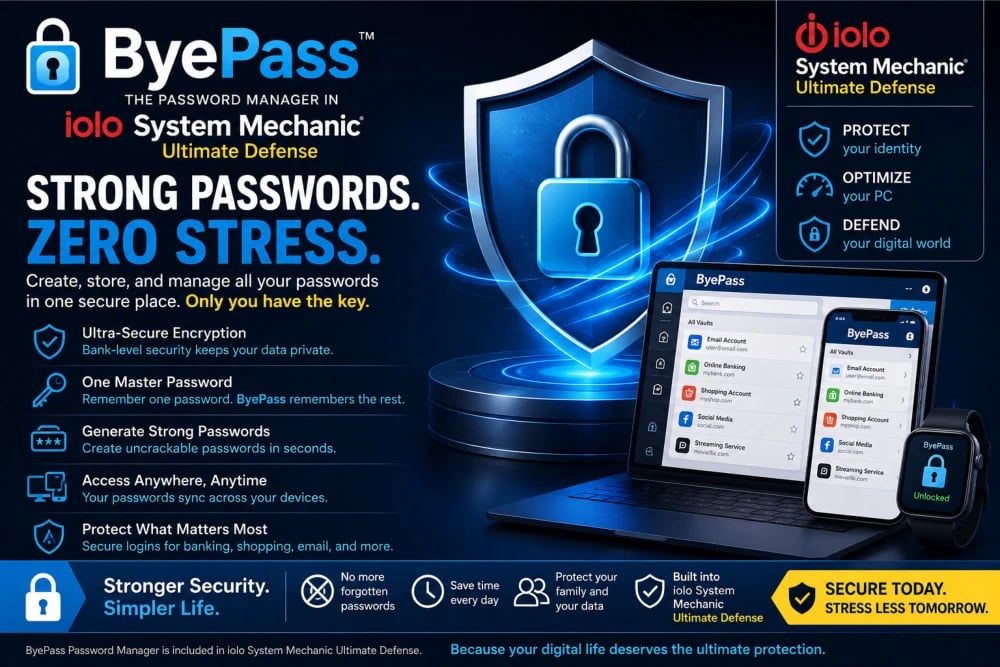
If you have ever stared at a login screen wondering, “Was my password my pet’s name, my birthday, or something with numbers at the end?” You are not alone. Most people use dozens of websites every month, from email and shopping accounts to banking apps and streaming services. Remembering every password can quickly become frustrating. Many people solve the problem by using the same password everywhere, but that creates a serious security risk. ByePass is a Password Manager tool provided in iolo System Mechanic, which is designed to remove that stress and make password protection easier for everyday users. Think about a lady named Sarah who uses “Sarah123” for her email, online shopping, and social media accounts. If one website experiences a data breach, all the accounts with the same password may become vulnerable. ByePass, the Password Manager, helps organize, protect, and simplify passwords so users can focus on daily life instead of constantly trying to remember login details because a password manager automatically generates a strong password for each of your websites, stores them securely, and autofills them where required at the click of your mouse.
Password Problems Are Bigger Than Most People Realize
Many people assume that password security only matters to businesses or technology professionals. In reality, almost everyone depends on passwords every day. Your email account, food delivery app, online shopping account, and even your video streaming subscription require passwords. The challenge is that many people create passwords that are easy to remember but also easy for cybercriminals to guess. Imagine someone named Goliath who uses “Footballer2025” for several accounts because it is simple to remember. It feels convenient at first, but if one account gets exposed, attackers often try that same password across multiple websites. Suddenly, one small issue becomes several bigger problems. ByePass, the password manager in iolo System Mechanic Ultimate Defense, helps users break this risky habit by allowing them to create stronger passwords without the pressure of memorizing every single one. It turns password management from a daily struggle into something simple and easily manageable.
Get iolo System Mechanic Ultimate Defense with Password Manager
Password Manager: One Password to Remember Instead of Twenty
People often avoid creating unique passwords because they believe they will never remember them all. That concern makes complete sense. Nobody wants to keep sticky notes on a desk or maintain a notebook filled with login information. A Password Manager solves this challenge by reducing the burden. Instead of remembering twenty or thirty passwords, users only need to remember one Master Password. Enter the Master Password, and the password manager gives you access to all your passwords. Everything else can be securely organized in one place. Imagine George logging into his favorite shopping website, email account, and online banking portal. Without a password manager, he might constantly click “Forgot Password” because he cannot remember which credentials belong to which account. With a Password Manager, those details are already securely stored and ready whenever needed. Instead of spending time resetting passwords and becoming frustrated, users enjoy a smoother and less stressful experience every day when they use the Password Manager in iolo System Mechanic Ultimate Defense.
Password Manager: Strong Passwords Without the Headaches
Creating strong passwords sounds easy until people actually try doing it. Security experts recommend using combinations of uppercase letters, lowercase letters, symbols, and numbers. The problem is that passwords such as “P#4xM9!Rt$7Q” are difficult to remember. Most people naturally fall back to simple passwords like “John123” or “Welcome2025.” ByePass which is the name of the Password Manager in iolo System Mechanic Ultimate Defense, removes this problem entirely. It can help users create stronger passwords while storing them securely and safely, so there is no pressure to memorize complicated combinations. Imagine Ismael creating a new account for an online movie streaming service. Instead of choosing “IsmaelMovie1,” the Password Manager helps create something stronger and more secure. Emily does not have to write it down or worry about forgetting it because the password manager remembers it for her. Users gain stronger protection without making daily computer use more difficult by using ByePass Password Manager in iolo System Mechanic Ultimate Defense.
Get iolo System Mechanic Ultimate Defense with Password Manager
Password Manager Makes Logging In Faster and Easier
Many people think security tools make life more complicated, but good tools actually make everyday tasks easier. ByePass is the password manager tool in iolo System Mechanic Ultimate Defense, that is designed to simplify the login process rather than slow it down. Imagine opening your favorite shopping website and instantly signing in without typing in long and complicated passwords every single time. Instead of searching through notebooks, old emails, or sticky notes attached to computer screens, your credentials are available when you need them. Think about a user named Kiran who checks her email before work every morning, shops online during lunch, and watches streaming content in the evening. Without a password manager, she might waste time entering usernames and passwords. With a password manager, those everyday tasks become smoother. Small improvements like these can save time while also making online activity feel easier and less frustrating when using iolo System Mechanic Ultimate Defense Password Manager called ByePass.
Password Manager Gives Protection Against Password Reuse
Reusing a password may feel harmless, but it creates one of the most common online security risks. People reuse a password because it feels easier than creating something different for every account. Unfortunately, cybercriminals understand this behavior and actively exploit it. Imagine Alexander using “Alex2025!” for his email account, gaming account, and online shopping account. If one website experiences a breach, attackers immediately test those same credentials elsewhere. Suddenly, multiple accounts may become vulnerable. A Password Manager encourages safer habits by helping users maintain unique passwords across different accounts. Think of passwords as keys to different rooms inside a house. If every room uses the same key, losing that one key creates a bigger problem. If different keys protect different spaces, then losing one key will only stop you from entering that room, and all other rooms remain accessible. ByePass, the password manager in iolo System Mechanic Ultimate Defense, helps users create those separate layers of protection without making the process difficult or overwhelming.
Password Manager: Beginner-Friendly Experience for Every User
Not everyone feels comfortable with technology, and many users worry about using tools they think might be complicated. A Password Manager is built for regular people, not only computer experts. You do not need cybersecurity knowledge or years of technical experience to use it. Imagine your parents or grandparents using a computer mainly for email, browsing websites, and paying bills online. They should not have to learn complicated security terms or advanced computer settings just to protect passwords. Password Manager focuses on simplicity and ease of use. Instead of overwhelming users with technical details, it helps guide them through password organization in a practical way. Security should feel accessible rather than intimidating. The goal of ByePass Password Manager provided in iolo System Mechanic Ultimate Defense is to help users feel more confident and comfortable while using their computers every day.
Get iolo System Mechanic Ultimate Defense with Password Manager
Password Manager Protects What Matters Most
A password protects more than websites and apps. They protect pieces of your personal life. Your email may contain important conversations. Your online shopping account may include payment information. Your social media account may contain photos and memories collected over many years. Imagine Mary discovering someone accessed her email because she reused an old password from another website. Suddenly, she worries about personal information, contacts, and account recovery. Situations like this create stress that many people never expect. ByePass, the Password Manager in iolo System Mechanic Ultimate Defense, helps users strengthen the barriers protecting those important parts of daily life. Instead of waiting until problems appear, users can create stronger protection in advance. Prevention often feels easier than dealing with problems after they happen.
Password Manager: Security That Fits Into Everyday Life
Good security should become part of daily routines rather than something people constantly think about. Imagine preparing for work each morning. You check email, browse news websites, and sign into applications you use every day. These activities should feel quick and simple. ByePass works quietly in the background while helping organize and protect passwords without interrupting normal computer use. Think about Christopher, who enjoys online shopping and watching movies but dislikes managing passwords. ByePass, the Password Manager in iolo System Mechanic Ultimate Defense, allows him to focus on those activities instead of worrying about login details. Security works best when it becomes almost invisible, supporting users without adding extra stress or confusion.
Password Manager Makes You Feel More Confident Online
Many people experience small moments of uncertainty while using the internet. Questions like “Did I already use this password somewhere?” or “Will I remember this next week?” happen regularly. Over time, these little concerns create frustration. A Password Manager helps remove much of that uncertainty by creating a simpler password experience. Imagine someone signing into a new website without worrying about creating another easy-to-forget password. Instead of feeling uncertain, they feel prepared and organized. Small improvements in convenience often create bigger improvements in confidence. By using ByePass, the Password Manager in iolo System Mechanic Ultimate Defense, users spend less time worrying about passwords and more time enjoying their digital experiences.
Get iolo System Mechanic Ultimate Defense with Password Manager
Password Manager is a Smarter Way Forward
The number of accounts people use continues to grow every year. As more activities move online, password management becomes increasingly important. Trying to remember everything manually becomes harder over time. ByePass, the Password Manager in iolo System Mechanic Ultimate Defense, helps users adapt to this growing digital world with a simpler approach. Imagine creating accounts for online classes, banking applications, shopping websites, and streaming services throughout the year. Without organization, passwords quickly become difficult to manage. ByePass, the Password Manager in iolo System Mechanic Ultimate Defense, creates a system that grows with users instead of becoming more stressful. It provides support for daily digital life in a practical and approachable way.
Leave Your Password Frustration Behind
Managing passwords should not feel like solving a puzzle every day. You should not need sticky notes on your desk or repeated password reset emails filling your inbox. ByePass Password Manager in iolo System Mechanic helps transform password protection into a simpler experience designed for real people. Imagine opening your computer and signing into the services you need without frustration, confusion, or worry. Instead of spending time trying to remember passwords, users can spend more time enjoying what matters most. Stronger security, easier access, and better organization can all work together in one place. Password management does not have to feel complicated anymore. With ByePass, the Password Manager in iolo System Mechanic Ultimate Defense, everyday users can take control of their digital lives with greater confidence and less stress.
SystemMechanic VPN Drivers RegistryCleaner DefragmentHDD RunWindows_on_Mac Email_Marketing Windows_11
Home Sitemap Privacy Terms Disclaimer
© 2026. All rights reserved.